
Guide · Updated 9 October 2026
Can you use an Apple Pencil on a Mac?
Not directly. But with an iPad in between, a Pencil can sketch into Mac documents, draw in Mac apps, or mark up anything on the Mac screen live.
Quick answer
Apple Pencil only works on the screen of a compatible iPad. Macs have no touchscreen and no Pencil support. To use a Pencil with a Mac, go through an iPad: Sidecar makes the iPad a Mac display that accepts Pencil input in supporting apps, Continuity Sketch inserts a sketch into a Mac document, and PadCanvas lets the Pencil draw over anything on the Mac screen as you talk.
Why it doesn’t work directly
Apple Pencil pairs with an iPad and is detected by the iPad’s display. A Mac display has nothing to detect it, and macOS doesn’t accept a Pencil as an input device. Everything that “uses a Pencil on a Mac” uses the iPad as the drawing surface and sends the result to the Mac.
Pick the method by what you want to do
| You want to… | Use |
|---|---|
| Draw or edit inside a Mac app with the Pencil | Sidecar: iPad as a second display. Built in and free. |
| Put a quick sketch into a document or email | Continuity Sketch: File → Insert from iPhone or iPad → Add Sketch. |
| Draw on Keynote slides during a Keynote show | Keynote Remote drawing on iPhone or iPad. |
| Circle, underline or spotlight anything on the Mac screen while presenting, teaching or on a call | PadCanvas: the iPad becomes the pen for an overlay on the Mac. |
Drawing over your Mac screen with a Pencil
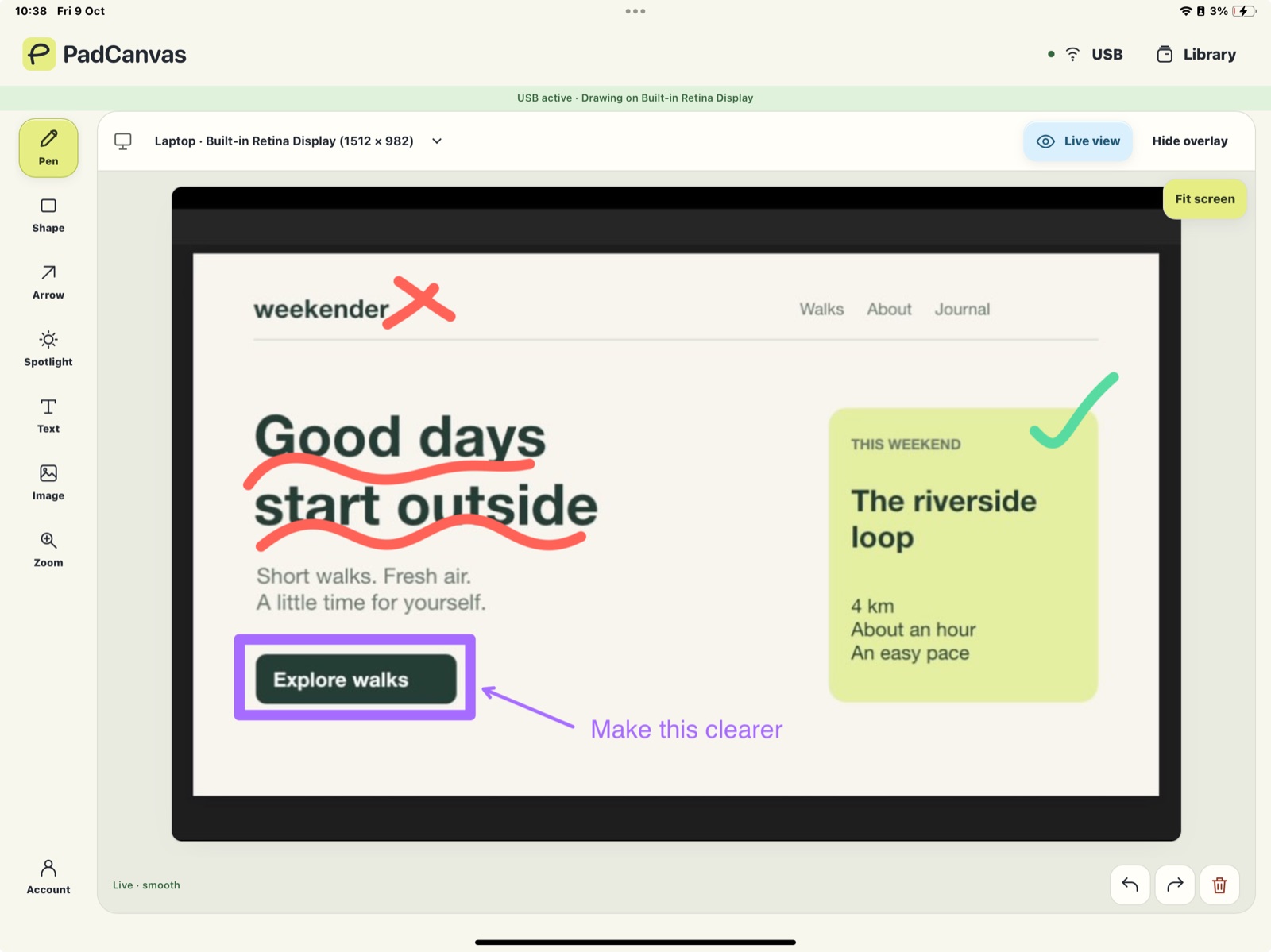
PadCanvas puts a transparent overlay on the Mac display you choose. The companion on your iPad shows a live view of that screen over USB or Wi‑Fi. Draw with Apple Pencil and every stroke lands in the same place on the Mac, where your audience, projector or screen share sees it. Use ink, arrows, shapes, text and images, or move a spotlight to pick out one detail.
See all the ways to draw on a Mac from an iPad →
Questions
Can I connect an Apple Pencil to a MacBook?
No. Apple Pencil pairs with compatible iPads only. You can use it with a Mac through an iPad, with Sidecar or with a companion app such as PadCanvas.
Does Sidecar let me draw over any app?
Sidecar sends Pencil input to the Mac app you’re using, and drawing works in apps that support it. It doesn’t add a layer over every app. For that, use an overlay app such as PadCanvas.
Which iPads work with PadCanvas?
The companion runs on iPads with iPadOS 16 or later. Apple Pencil works on iPads that support it.
Try it on your own screen
Seven days free, then £4.99 a year. The iPhone & iPad companion is included.
Requires an Apple-silicon Mac with macOS 14 or later, and an iPhone or iPad with iOS or iPadOS 16 or later. Apple Pencil works on compatible iPads.