
Guide · Updated 9 October 2026
Draw on your screen during Zoom, Google Meet and Teams calls
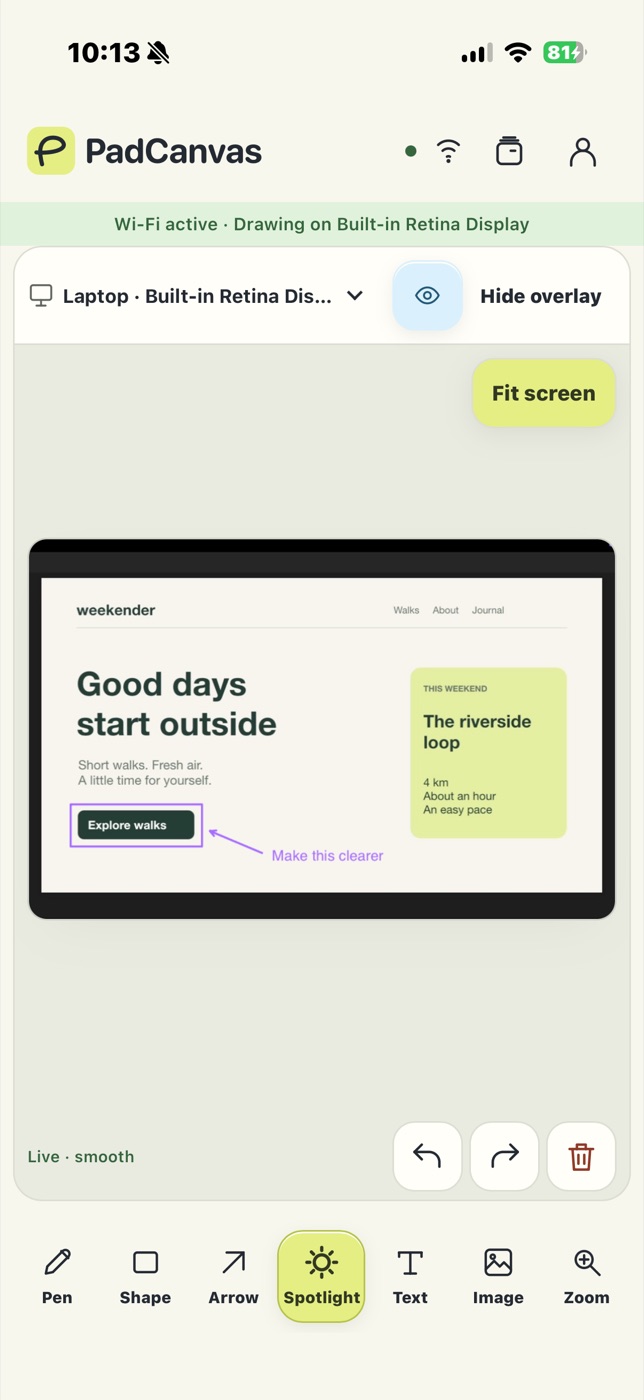
Circle the number, point at the button, sketch the idea. Everyone on the call sees it, because the drawing is on your Mac’s screen, not inside the meeting app.
Quick answer
PadCanvas draws on the Mac display itself, so it works in any video call app. Choose a display in PadCanvas, share that entire display in Zoom, Google Meet or Microsoft Teams, then draw from your iPhone or iPad. Sharing a single window or browser tab may leave your marks out, so share the whole screen and make a test mark first.
Share the right thing
| App | Share this |
|---|---|
| Zoom | Share Screen → choose the screen you selected in PadCanvas, not a window. |
| Google Meet | Present now → Entire screen → the same display. |
| Microsoft Teams | Share → Screen → the same display. |
Then ask someone on the call whether they can see a short test line before you start.
Why not use the meeting app’s own pen?
Zoom, Google Meet and Teams each have annotation tools, and they vary by app, plan and platform. PadCanvas behaves the same in every call and in the room, because it draws on your Mac. You draw with a finger or Apple Pencil on the device in your hand, with a spotlight, text, images and zoom alongside the pen.
Recordings and screenshots
When a recording captures your shared screen, your drawing is part of that screen. Test with your own recording settings before an important session. To keep a drawing for later, save it or the whole project in PadCanvas on your Mac.
Questions
Will people see my annotations in Google Meet?
Yes, if you share the entire display you selected in PadCanvas. Sharing only a tab or one window may leave out the drawing.
Does it work in Microsoft Teams and Webex?
PadCanvas doesn’t depend on the meeting app. Any app that shares your whole Mac display shows the drawing.
Can I draw while someone else presents?
PadCanvas draws on your own Mac’s screen. To mark up someone else’s shared screen, use the meeting app’s own annotation tools.
Try it on your own screen
Seven days free, then £4.99 a year. The iPhone & iPad companion is included.
Requires an Apple-silicon Mac with macOS 14 or later, and an iPhone or iPad with iOS or iPadOS 16 or later. Apple Pencil works on compatible iPads.